.png)
Image Optimization
Cimo automatically optimizes your images as soon as you upload them. When working inside the WordPress Block Editor, simply insert a Native Image Block and upload your image to the Media Library. Cimo will instantly convert the file to .webp format for improved performance.
To verify that an image has been optimized, open the image in the Media Library and check the information panel on the right. If optimization is successful, you will see an “Image Optimized by Cimo” notice.
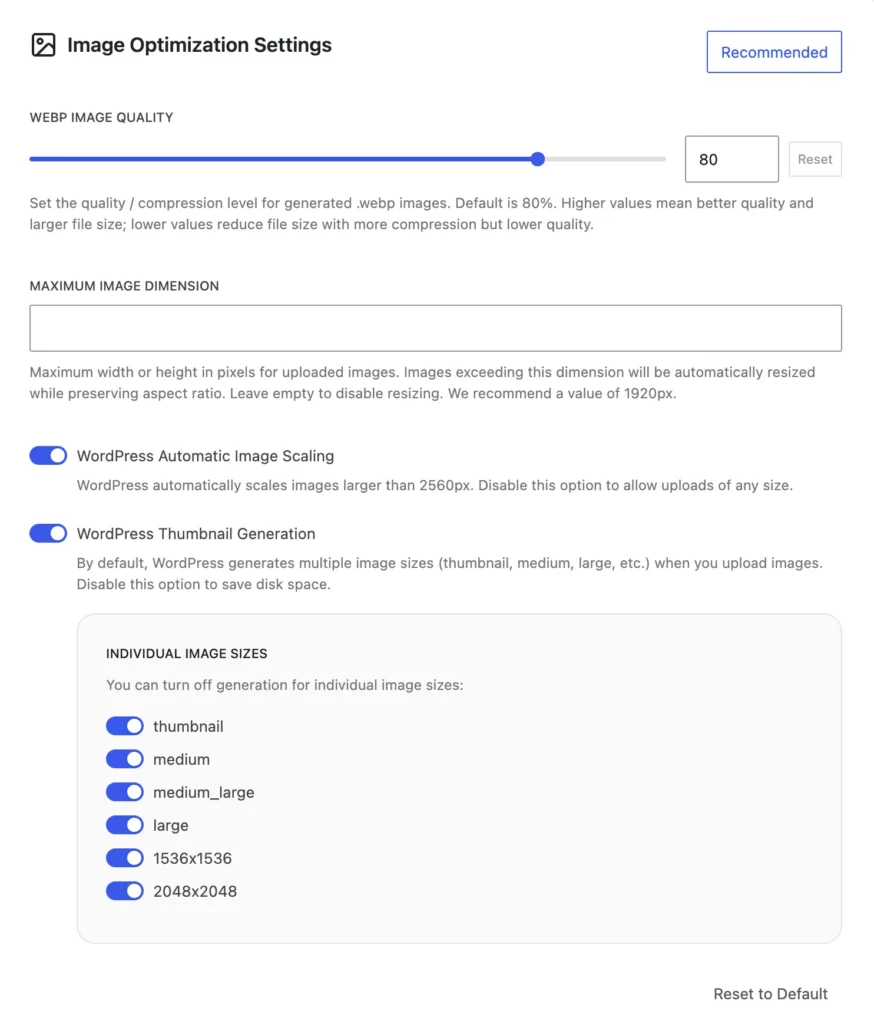
The Image Optimization Settings give you control over how images are handled when you upload them to WordPress.
💡 You can click on the Recommended button for a preset of our recommended settings for Image Optimization.
The WebP Image Quality option lets you set the compression level for generated .webp images. The default value is 80%. A higher value keeps more detail but produces a larger file size, while a lower value reduces the file size at the cost of image quality.
The Maximum Image Dimension setting lets you define the maximum width or height (in pixels) for uploaded images. Any image that exceeds this value will be automatically resized while preserving its aspect ratio. If you want to disable resizing, you can leave this field empty. We recommend using 1920px for optimal performance and display quality.
WordPress Automatic Image Scaling controls whether WordPress should automatically scale down images that are larger than 2560px. If you prefer to upload images at their original size without WordPress reducing them, you can turn this option off.
WordPress Thumbnail Generation can be disabled if you want to prevent WordPress from creating multiple image sizes during upload, which helps save disk space. For finer control, you can individually disable the generation of specific image sizes, including thumbnail, medium, medium_large, large, 1536×1536, and 2048×2048. This is helpful if you don’t really use resized image sizes.
If you want to revert your changes, you can use Reset to Default button to restore all image optimization settings to their original values.